Part II - Token Storage
In this second tutorial we will improve upon the previous tutorial. We will see more advanced method calling and responses. We will add services, routing and http interceptors.
After logging in, the bexstream backend replies with a user token. This user token must be sent in all API calls to identify the user making the API call. In this tutorial we will use the browser’s local storage to save the token.
1 – Create WebStorageService
Add the WebStorageService inside folder lib
ng generate service lib/web-storage
Import webstorage module:
npm install ngx-webstorage-service@4.1.0
Add read and write features to web-storage.service.ts:
 1import { Inject, Injectable, InjectionToken } from '@angular/core';
 2import { StorageService } from 'ngx-webstorage-service';
 3
 4export const BEXSTREAM_SERVICE_STORAGE =
 5new InjectionToken<StorageService>('BEXSTREAM_SERVICE_STORAGE');
 6
 7const STORAGE_KEY = 'bexstream-token';
 8
 9@Injectable({
10    providedIn: 'root'
11})
12export class WebStorageService {
13
14    constructor(
15    @Inject(BEXSTREAM_SERVICE_STORAGE) private storage: StorageService
16    ) { }
17
18    public storageToken(token: string): void {
19        this.storage.set(STORAGE_KEY, token);
20    }
21
22    public getStoredToken(): string {
23        return this.storage.get(STORAGE_KEY);
24    }
25
26    public removeStoredToken(): void {
27        this.storage.remove(STORAGE_KEY);
28    }
29
30    public clearLocalStorage(): void {
31        this.storage.clear();
32    }
33}
Afterwards we need to import this new service into app.module.ts
 1import { BrowserModule } from '@angular/platform-browser';
 2import { NgModule } from '@angular/core';
 3import { ReactiveFormsModule } from '@angular/forms';
 4import { HttpClientModule } from '@angular/common/http';
 5import { LOCAL_STORAGE } from 'ngx-webstorage-service';
 6
 7import { AppRoutingModule } from './app-routing.module';
 8import { AppComponent } from './app.component';
 9import { LoginComponent } from './login/login.component';
10import { BEXSTREAM_SERVICE_STORAGE, WebStorageService } from './lib/web-storage.service';
11
12@NgModule({
13declarations: [
14    AppComponent,
15    LoginComponent
16],
17imports: [
18    BrowserModule,
19    AppRoutingModule,
20    ReactiveFormsModule,
21    HttpClientModule
22],
23providers: [
24    {provide: BEXSTREAM_SERVICE_STORAGE, useExisting: LOCAL_STORAGE},
25    WebStorageService
26    ],
27bootstrap: [AppComponent]
28})
29export class AppModule { }
Now that the WebStorage service is created we need to use it on the LoginComponent.
 1import { Component, OnInit } from '@angular/core';
 2import { FormBuilder } from '@angular/forms';
 3import { HttpClient } from '@angular/common/http';
 4import { User } from './models/user';
 5import { WebStorageService } from '../lib/web-storage.service';
 6
 7@Component({
 8    selector: 'app-login',
 9    templateUrl: './login.component.html',
10    styleUrls: ['./login.component.less']
11})
12export class LoginComponent implements OnInit {
13
14    user = { username: '', password: '' }; // see body on OpenAPI definition for POST /api/v1/auth/user
15
16    loginForm = this.formBuilder.group({
17        username: '',
18        password: ''
19    });
20
21    constructor(private formBuilder: FormBuilder,
22                private webStorage: WebStorageService,
23                private http: HttpClient) { }
24
25    ngOnInit(): void {
26        this.user = { username: '', password: '' };
27        this.webStorage.removeStoredToken(); // implicit logout on init
28    }
29
30    /**
31    * User authentication method
32    */
33    public authenticate(): void {
34        const loginFormValues = this.loginForm.value
35        this.user.username = loginFormValues.username;
36        this.user.password = loginFormValues.password;
37
38        this.http.post<{ token: string }>('https://bexstream-preprod.beyond-vision.com/api/v1/auth/user', this.user)
39            .subscribe({
40                next: (result) => {
41                    if (result.token) {
42                        this.webStorage.storageToken(result.token);
43                        alert(`${this.user.username} has been successfully logged in!`);
44                    } else {
45                        alert(`Unexpected response from the server for /api/v1/auth/user. Check the network request/response for details!`);
46                    }
47                },
48                error: (err) => {
49                    alert(`Error on login. Please check the username and the password!.`);
50                }
51            });
52    }
53
54}
Restart the application:
ng serve
Login using the following credentials:
user: drone-pilot-tutorial
pass: drone-pilot-tutorial
And check on you browser developer tools if the token has been recorded:
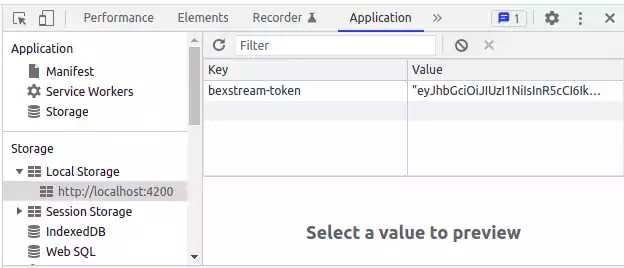
By this step we have already logged in and stored the user token on the browser’s local storage. For the last step we need to attach this token for each bexstream API invocations. So on each invocation we must add to the request’s header the following:
Authorization: ‘Bearer {token}’
This token is used for user acces control and to identify who is doing the invocation.
We could attach the Authorization header on each request, but Angular has a built in feature called HTTP Interceptor that does this for us. We just need to configure it.
Firstly let’s add ou interceptor:
ng generate interceptor lib/interceptors/jwt
We will use the WebStorageService to retrieve the user token and for each request we will add to each request’s header the User Token.
Open the file jwt.interceptors.ts and add the following code:
 1import { Injectable } from '@angular/core';
 2import {
 3    HttpRequest,
 4    HttpHandler,
 5    HttpEvent,
 6    HttpInterceptor
 7} from '@angular/common/http';
 8import { Observable } from 'rxjs';
 9import { WebStorageService } from '../web-storage.service';
10
11@Injectable()
12export class JwtInterceptor implements HttpInterceptor {
13
14    constructor(private webStorage: WebStorageService) {}
15
16    intercept(request: HttpRequest<any>, next: HttpHandler): Observable<HttpEvent<any>> {
17        // add authorization header with jwt token if available
18        const apiToken = this.webStorage.getStoredToken();
19        if (apiToken) {
20            request = request.clone({
21                setHeaders: {
22                    Authorization: `Bearer ${apiToken}`
23                }
24            });
25        }
26
27        return next.handle(request);
28    }
29}
Now let’s add our JwtInterceptor to the app.module.ts:
 1import { BrowserModule } from '@angular/platform-browser';
 2import { NgModule } from '@angular/core';
 3import { ReactiveFormsModule } from '@angular/forms';
 4import { HTTP_INTERCEPTORS, HttpClientModule } from '@angular/common/http';
 5import { LOCAL_STORAGE } from 'ngx-webstorage-service';
 6import { JwtInterceptor } from './lib/interceptors/jwt.interceptor';
 7
 8import { AppRoutingModule } from './app-routing.module';
 9import { AppComponent } from './app.component';
10import { LoginComponent } from './login/login.component';
11import { BEXSTREAM_SERVICE_STORAGE, WebStorageService } from './lib/web-storage.service';
12
13@NgModule({
14    declarations: [
15        AppComponent,
16        LoginComponent
17    ],
18    imports: [
19        BrowserModule,
20        AppRoutingModule,
21        ReactiveFormsModule,
22        HttpClientModule
23    ],
24    providers: [
25        {provide: BEXSTREAM_SERVICE_STORAGE, useExisting: LOCAL_STORAGE},
26        {provide: HTTP_INTERCEPTORS, useClass: JwtInterceptor, multi: true},
27        WebStorageService
28    ],
29    bootstrap: [AppComponent]
30})
31export class AppModule { }